A smarter way to talk to your TV: Microsoft Copilot launches on Samsung TVs and monitors
Microsoft announced the launch of Copilot on select Samsung TVs and monitors, bringing its voice-powered AI to the biggest screen in the home at no cost. Copilot offers a voice interface, a friendly animated on-screen character, and visual cards for tasks like recaps, recommendations, and everyday questions. The feature is positioned as a shared, social experience for families and groups.
Key Takeaways
- Voice-powered AI meets a visual companion for entertainment, everyday help, and everything in between.
Redmond, Wash., August 27-Today, we're announcing the launch of Copilot on select Samsung TVs and monitors, transforming the biggest screen in your home into your most personal and helpful companion-and it's free to use.
- Now you can quickly find what you're looking for and discover new favorites right from your living room.
Because it lives on the biggest screen in the home, Copilot is a social experience-something you can use together with family and friends to spark conversations, help groups decide what to watch, and turn the TV into a shared space for curiosity and connection.
- Custom, spoiler-free recaps: "I want to get back into The Crown, I left off at Season 3, Episode 4.
Ultra-specific recommendations: "Like The Queen's Gambit , but about cooking instead of chess, and under two hours."
- or "Cheer me up after a breakup."
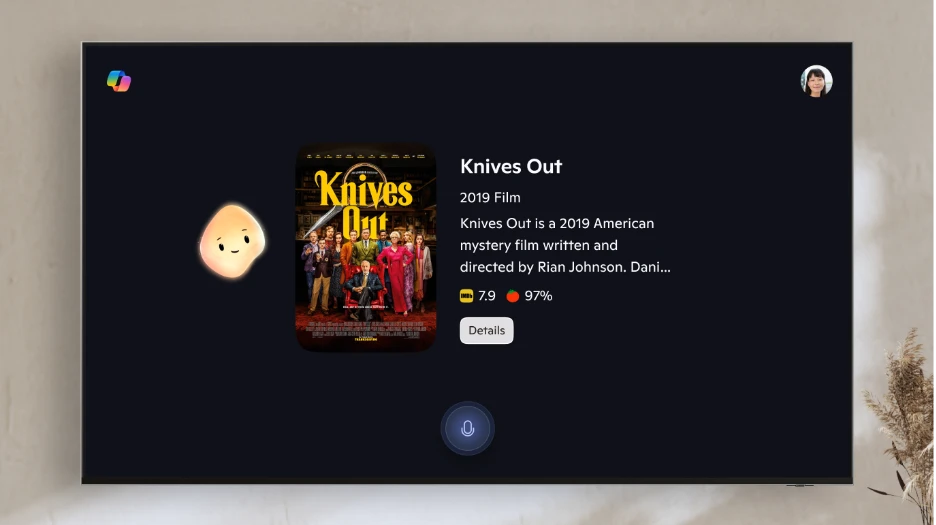
A more visual, more personal experience Copilot's appearance is a friendly, animated presence on your TV that reacts and lip-syncs as it speaks, with expressions that match the tone of the conversation.
- (Optional) Sign in for a personal touch: Use a quick QR code to connect your Microsoft account and unlock Copilot's personalization, memory, and preferences for you.
Voice-powered AI meets a visual companion for entertainment, everyday help, and everything in between. Redmond, Wash., August 27-Today, we're announcing the launch of Copilot on select Samsung TVs and monitors, transforming the biggest screen in your home into your most personal and helpful companion-and it's free to use. Voice-powered AI meets a visual companion for entertainment, everyday help, and everything in between.
Redmond, Wash., August 27-Today, we're announcing the launch of Copilot on select Samsung TVs and monitors, transforming the biggest screen in your home into your most personal and helpful companion-and it's free to use. Voice-powered AI meets a visual companion for entertainment, everyday help, and everything in between. Redmond, Wash., August 27 -Today, we're announcing the launch of Copilot on select Samsung TVs and monitors, transforming the biggest screen in your home into your most personal and helpful companion-and it's free to use.
Copilot makes your TV easier and more fun to use with its voice-powered interface, friendly on-screen character, and simple visual cards. Now you can quickly find what you're looking for and discover new favorites right from your living room. Because it lives on the biggest screen in the home, Copilot is a social experience-something you can use together with family and friends to spark conversations, help groups decide what to watch, and turn the TV into a shared space for curiosity and connection.
"Copilot on Samsung TVs and monitors brings AI out of your pocket and into the heart of your home," said David Washington, Partner General Manager, Microsoft AI. "It's there when you and your family want to discover something to watch together, get answers to your questions, plan your weekend, or simply hang out." Built on partnership Microsoft and Samsung have a long history of bringing the best of technology together, from Windows and Office on Galaxy devices to Xbox Cloud Gaming on Samsung TVs.
This collaboration brings that same spirit of innovation to Copilot, making your TV smarter, more personal, and more fun. For recaps, rabbit holes, and everything in-between Copilot shines when it comes to finding your next favorite thing to watch, but it's also there for the little questions, big plans, and everyday moments in between. Custom, spoiler-free recaps: "I want to get back into The Crown, I left off at Season 3, Episode 4.
Perfect for when everyone's gathered in the living room and you want to decide together. Post-watch deep dives: "Who was the voice actor for that character?" or "What else has the director done?"
It's a visible reminder that your companion is listening, thinking, and responding just for you. And when Copilot answers, it doesn't just tell you; it shows you. Movies, weather, and image results appear as rich, glanceable cards designed for the big screen, complete with ratings, photos, and key details.
How it works Activate Copilot: Copilot will roll out automatically on select Samsung TVs. Users can see Copilot (on the Apps Tab) at the Samsung Tizen OS home Samsung Daily+. Press the mic button on your Samsung remote and speak naturally.
For more details please read the original article at Microsoft Copilot.
Continue Learning
Comments
Comments appear only after moderation. Your email identifies your submission to the moderator and is never displayed here.
No approved comments yet.