Accelerate campaign workflow with insights from Adobe Marketing Agent for Amazon Quick
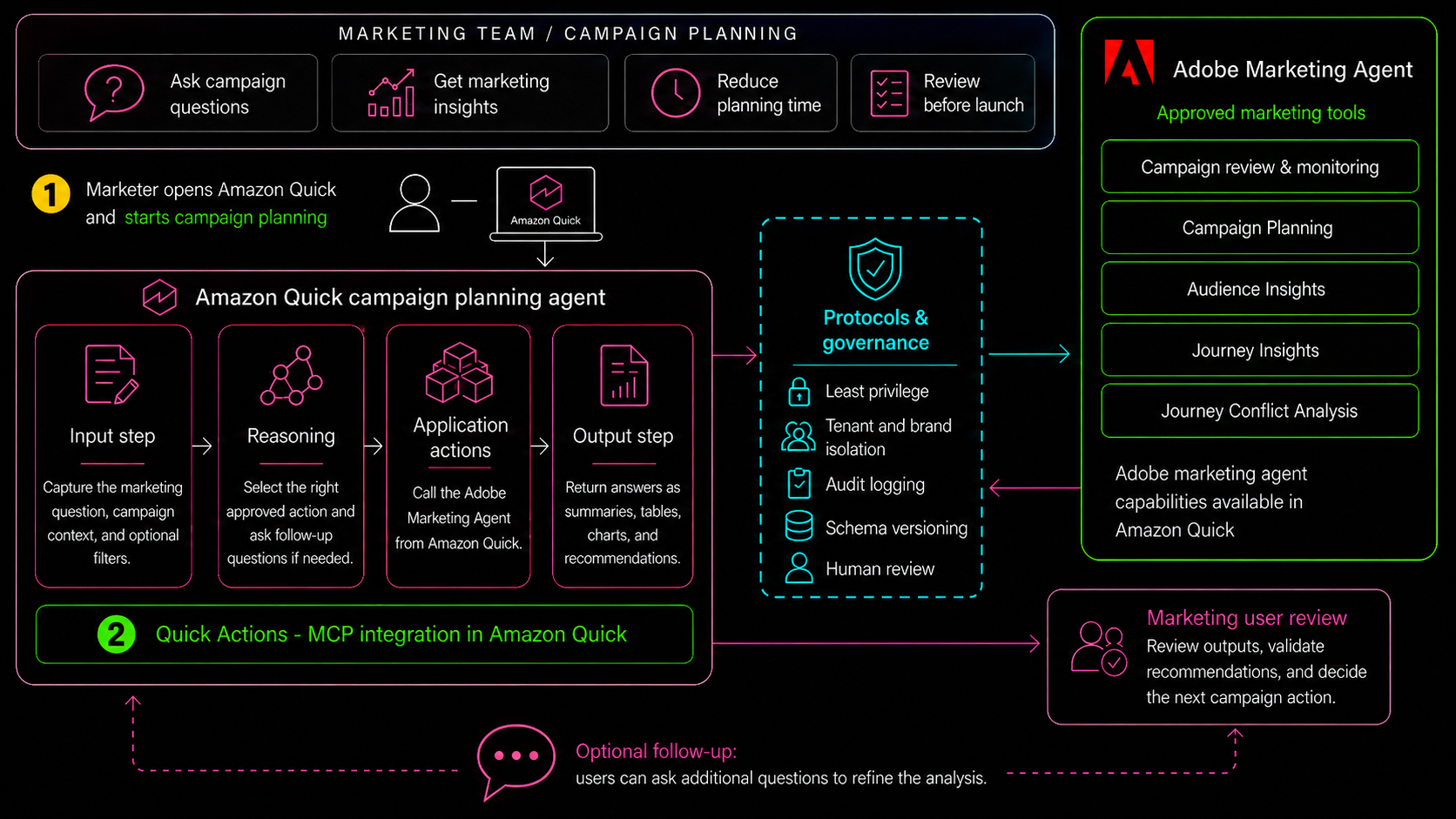
Adobe has introduced a Marketing Agent for Amazon Quick that integrates with the Model Context Protocol (MCP) to provide marketers with real-time insights directly in Amazon Quick. The integration enables users to authenticate with Adobe credentials and access audience rankings, loyalty segments, journey data, and conflict recommendations without leaving the Amazon Quick interface.
Key Takeaways
- Adobe Marketing Agent for Amazon Quick uses Model Context Protocol (MCP) to streamline integration and enable seamless data access
- Marketers can authenticate using existing Adobe credentials, reducing setup complexity and improving security
- The integration provides actionable insights including audience rankings, loyalty segment summaries, journey usage metrics, and conflict recommendations
- Users can access marketing intelligence directly within Amazon Quick, eliminating the need to switch between platforms
- The workflow is designed to accelerate campaign planning and decision-making by delivering consolidated analytics in one interface

What is Adobe Marketing Agent for Amazon Quick?
Adobe Marketing Agent represents a bridge between Adobe's marketing intelligence platform and Amazon Quick's conversational interface.
- ›Leverages Model Context Protocol (MCP) to establish standardized communication between Adobe systems and Amazon Quick
- ›Delivers real-time marketing insights and recommendations without requiring users to navigate multiple dashboards
- ›Integrates audience analytics, loyalty program data, and customer journey metrics into a single query interface
- ›Designed specifically for marketing teams that need rapid access to campaign-relevant data
Setting Up the Integration
Configuring Adobe Marketing Agent for Amazon Quick involves a straightforward process centered on MCP setup and Adobe authentication.
- ›Begin by enabling the Model Context Protocol connection between Adobe and Amazon Quick platforms
- ›Use your existing Adobe credentials to authenticate, eliminating the need for separate account management
- ›Configure the integration settings to specify which Adobe data sources and insights should be accessible
- ›Test the connection to ensure data flows correctly and that Amazon Quick can communicate with Adobe backends
The integration process prioritizes security and ease of use. By leveraging your current Adobe credentials, the setup avoids creating additional user accounts or managing complex API keys separately. The Model Context Protocol standardizes how data is requested and delivered, making the configuration process consistent across different environments and reducing potential misconfigurations.
Authentication and Security
Authentication in this integration is handled through your existing Adobe credentials, maintaining consistent identity and access management.
- ›Use your Adobe ID to log in once, and credentials are securely shared with the Amazon Quick integration
- ›Adobe's authentication protocols ensure that only authorized users can access marketing data through the agent
- ›Credentials are encrypted and do not require additional storage or management within Amazon Quick
- ›Session management is handled automatically, reducing manual re-authentication requirements
This credential-based approach simplifies the user experience while maintaining strong security standards. Teams do not need to distribute separate API tokens or manage multiple authentication systems. The integration respects Adobe's identity governance, meaning that user permissions and role-based access control in Adobe are automatically reflected in what data the Marketing Agent can retrieve.
Key Insights Available Through the Agent
The Adobe Marketing Agent surfaces several critical marketing intelligence categories that help teams make faster, data-driven decisions.
- ›Audience Rankings: Identifies your highest-value audience segments and their performance metrics
- ›Loyalty Segment Summaries: Provides breakdowns of customer loyalty tiers, engagement levels, and retention trends
- ›Journey Usage: Shows how customers are progressing through defined marketing journeys and where engagement occurs
- ›Conflict Recommendations: Alerts teams to conflicting campaigns, messaging, or audience allocations that could impact performance
These insight categories are designed to address the most common workflow challenges in campaign management. Rather than assembling data from multiple reports, marketers can ask a single query in Amazon Quick and receive consolidated answers. The audience rankings help prioritize budget allocation, loyalty summaries inform retention strategies, journey data highlights bottlenecks or opportunities, and conflict recommendations prevent costly overlaps or messaging inconsistencies.
By surfacing these insights in a conversational interface, the agent transforms raw data into actionable guidance that can inform campaign adjustments in real time. Teams can iterate faster, test hypotheses quickly, and respond to audience behavior without waiting for manual data pulls or complex report builds.
Sample Workflow and Use Cases
A typical workflow demonstrates how marketing teams can leverage the agent to answer common business questions rapidly.
- ›Query audience rankings to determine which segments should receive increased media spend or personalization effort
- ›Review loyalty segment summaries to design retention campaigns or exclusion rules for high-value customers
- ›Examine journey usage data to identify underperforming stages and optimize customer progression
- ›Check conflict recommendations before launching new campaigns to avoid audience overlap or contradictory messaging
Consider a marketing manager planning a quarterly campaign. Instead of manually exporting data from Adobe, creating pivot tables, and cross-referencing audience definitions, they can ask the Marketing Agent in Amazon Quick: 'What are my top-performing segments by engagement, and are there any campaigns already targeting them?' The agent returns audience rankings, loyalty insights, active journey allocations, and flags any potential conflicts within seconds.
Another scenario involves a retention team needing to exclude high-value customers from a discount promotion. The agent can quickly summarize which loyalty tiers should be protected, preventing value erosion and improving overall campaign ROI. These workflows reduce decision-making time from hours to minutes, allowing teams to respond to market conditions and business priorities more effectively.
Benefits for Marketing Teams
The integration delivers multiple advantages that improve both efficiency and decision quality across marketing operations.
- ›Speed: Eliminates time spent switching between platforms or waiting for custom reports to be built
- ›Accessibility: Enables non-technical team members to access complex analytics through natural language queries
- ›Consistency: Ensures all queries pull from the same authoritative Adobe data sources, reducing confusion from conflicting reports
- ›Agility: Allows marketers to test ideas, validate assumptions, and iterate campaigns faster
By bringing insights directly into Amazon Quick, the integration removes friction from the marketing workflow. Team members no longer need deep familiarity with Adobe's interface or analytics structure; they can ask questions in plain language and receive structured answers. This democratization of data access accelerates decision-making and reduces bottlenecks caused by limited analytics expertise.
Getting Started
Implementing Adobe Marketing Agent for Amazon Quick is designed to be straightforward for most organizations.
- ›Verify that your Adobe instance supports the Model Context Protocol and Marketing Agent features
- ›Prepare your team's Adobe credentials and ensure users have appropriate permissions for the data they need to access
- ›Follow Adobe's integration documentation to enable the MCP connection and configure data access permissions
- ›Train team members on how to query the agent effectively and interpret the insights returned
Organizations should begin by reviewing Adobe's integration guides and ensuring their Adobe instance is up to date. Most modern Adobe instances support MCP, but confirming compatibility prevents setup delays. Once enabled, the integration requires minimal ongoing maintenance, allowing teams to focus on deriving value from faster, more accessible marketing insights rather than managing infrastructure.
Frequently Asked Questions
What is the Model Context Protocol (MCP) and why does Adobe use it?
MCP is a standardized protocol that enables secure, structured communication between different software platforms. Adobe uses MCP for this integration to ensure consistent, reliable data exchange between Adobe systems and Amazon Quick while maintaining security and compatibility.
Do I need separate authentication for Amazon Quick and Adobe?
No. The integration uses your existing Adobe credentials for authentication, so you only need to log in once. Your Adobe ID is securely shared with Amazon Quick through the integration, eliminating the need for separate account management.
What specific insights can I access through the Marketing Agent?
You can access audience rankings, loyalty segment summaries, journey usage metrics, and conflict recommendations-all designed to help with campaign planning, audience prioritization, retention strategy, and preventing overlapping or contradictory campaigns.
Can non-technical team members use the Marketing Agent?
Yes. The agent accepts natural language queries in Amazon Quick, making it accessible to marketers, campaign managers, and team members without deep technical or analytics expertise.
Does the integration require significant IT setup or ongoing maintenance?
The integration is designed for straightforward setup using your existing Adobe credentials and the Model Context Protocol. Once enabled, it requires minimal ongoing maintenance, allowing teams to focus on using insights rather than managing infrastructure.
Adobe Marketing Agent for Amazon Quick transforms how teams access and act on marketing intelligence, combining the power of Adobe's analytics with the conversational interface of Amazon Quick.
Continue Learning
Comments
Sign in to join the conversation