Build a meeting prep and follow-up assistant with Amazon Quick and Cisco Webex MCP servers
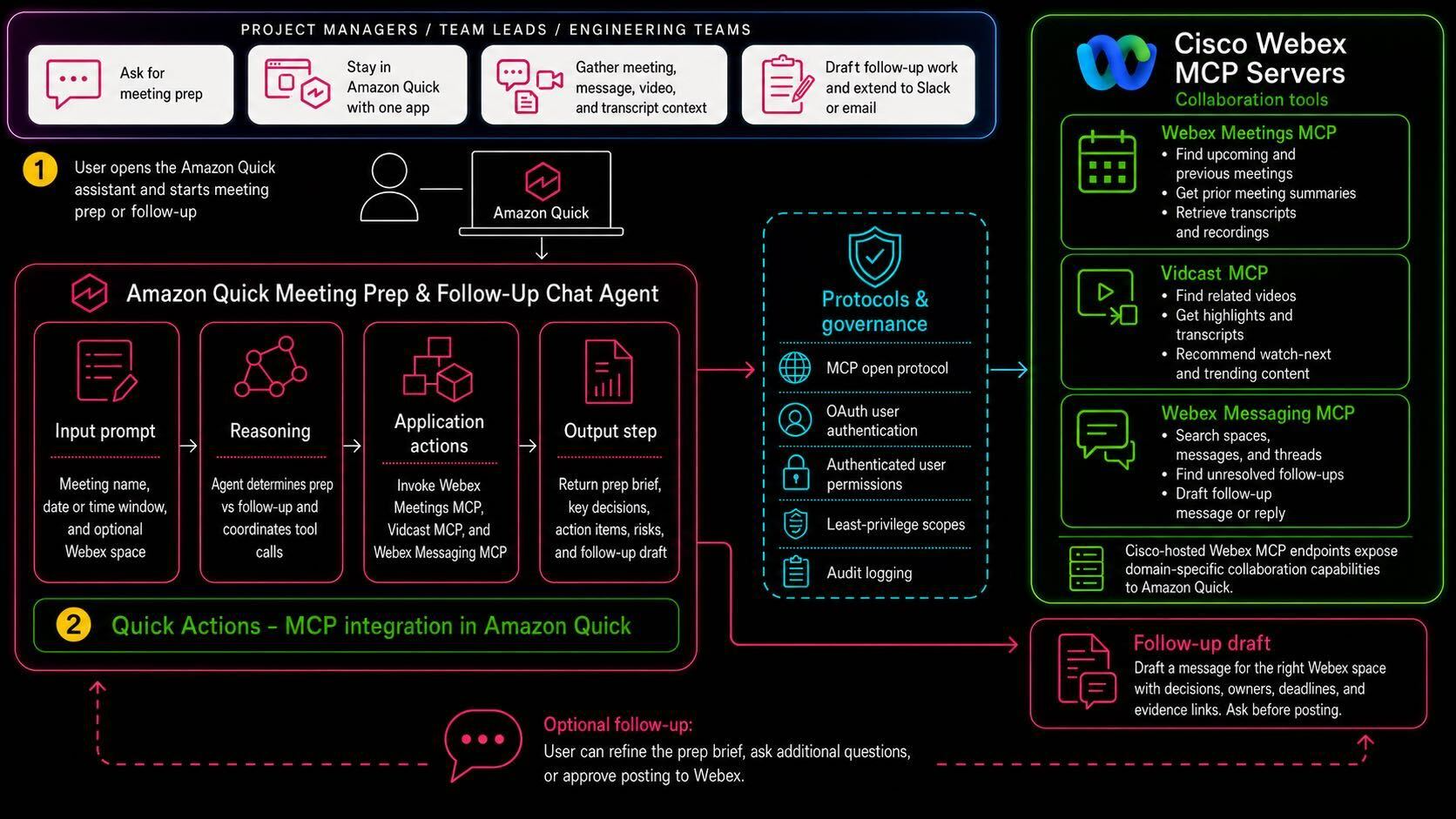
This article outlines the creation of a custom meeting prep and follow-up assistant that integrates Amazon Quick with Cisco Webex MCP servers. The assistant streamlines the meeting process by gathering relevant information before and after meetings, including summaries, transcripts, and unresolved follow-ups.
Key Takeaways
- The assistant can find upcoming Webex meetings and review previous meeting summaries.
- It pulls related Vidcast highlights and searches for unresolved follow-ups in Webex message threads.
- After meetings, the assistant summarizes discussions and identifies action items.
- It can draft follow-up messages for the appropriate Webex space based on the meeting context.
- This integration enhances productivity by automating meeting preparation and follow-up tasks.

Introduction to Meeting Assistants
Meeting assistants are becoming essential tools in modern workplaces.
- ›They help streamline communication and ensure that important tasks are not overlooked.
- ›Automating meeting preparation and follow-up can save time and improve efficiency.
With the rise of remote work, the need for effective meeting management has increased. Meeting assistants can play a crucial role in organizing discussions and ensuring that all participants are adequately prepared.
Building the Assistant with Amazon Quick and Cisco Webex MCP
Combining Amazon Quick with Cisco Webex MCP servers allows for a powerful assistant.
- ›Amazon Quick provides robust data handling capabilities.
- ›Cisco Webex MCP servers facilitate seamless integration with existing meeting infrastructure.
The assistant leverages the capabilities of both platforms to create a streamlined workflow. By utilizing Amazon Quick, the assistant can efficiently process and analyze data related to meetings.
Pre-Meeting Preparation Features
The assistant's pre-meeting features enhance readiness.
- ›It identifies upcoming Webex meetings based on user prompts.
- ›The assistant reviews prior meeting summaries and transcripts for context.
- ›It gathers Vidcast highlights relevant to the upcoming meeting.
Before a meeting, the assistant compiles a prep brief that includes all necessary information. This ensures that participants arrive informed and ready to contribute.
Post-Meeting Follow-Up Capabilities
After meetings, the assistant continues to provide value.
- ›It summarizes key discussion points and decisions made during the meeting.
- ›The assistant identifies actionable items for participants to follow up on.
- ›It can draft messages for the appropriate Webex space to keep everyone informed.
By summarizing discussions and highlighting action items, the assistant helps maintain momentum after meetings. This feature is particularly useful for teams that need to stay on track with their projects.
Benefits of Using the Assistant
Integrating this assistant can lead to significant productivity gains.
- ›It reduces the time spent on meeting preparation and follow-up.
- ›Participants can focus more on discussion rather than logistics.
- ›The assistant ensures that no important follow-ups are missed.
By automating routine tasks, teams can allocate more time to strategic discussions and decision-making. The assistant serves as a reliable partner in enhancing meeting effectiveness.
Conclusion
The meeting prep and follow-up assistant is a game-changer for remote teams.
By integrating Amazon Quick with Cisco Webex MCP servers, teams can improve their meeting processes significantly. This tool not only saves time but also enhances communication and accountability.
Frequently Asked Questions
What is the purpose of the meeting prep and follow-up assistant?
The assistant is designed to streamline the meeting process by preparing participants before meetings and summarizing discussions afterward.
How does the assistant gather information for meetings?
It reviews prior meeting summaries, transcripts, and searches for unresolved follow-ups in Webex message threads.
Can the assistant draft follow-up messages?
Yes, after meetings, the assistant can draft follow-up messages for the appropriate Webex space based on the meeting context.
What platforms are integrated to build this assistant?
The assistant is built using Amazon Quick and Cisco Webex MCP servers.
This innovative tool is set to transform how teams manage their meetings.
Continue Learning
Comments
Sign in to join the conversation