Build an agentic incident triage assistant with Amazon Quick and New Relic
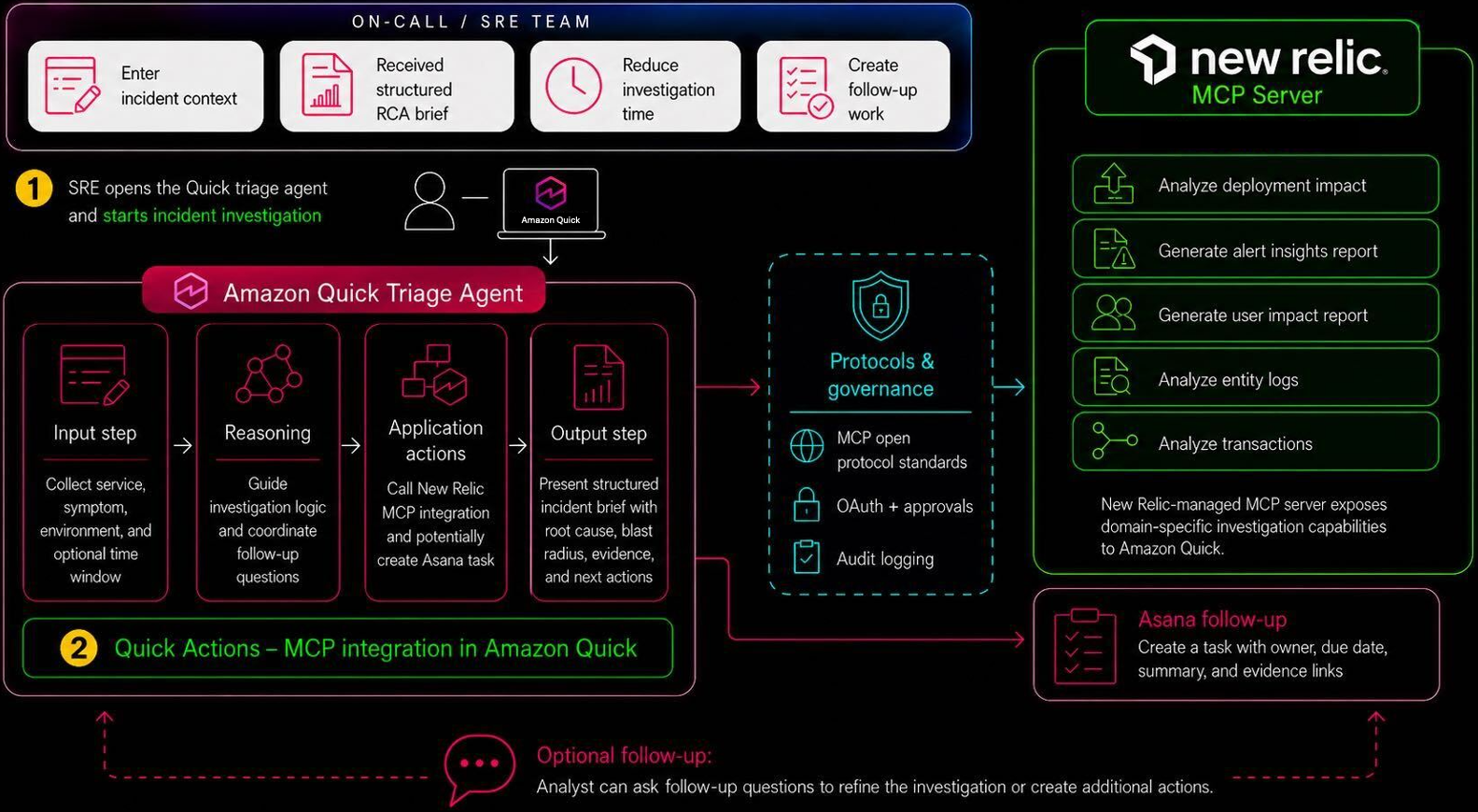
AWS published a guide showing engineering teams how to build an AI agent that handles incident triage from a single prompt. The agent uses Amazon Quick to investigate an outage through the New Relic Model Context Protocol (MCP) Server, write a root cause analysis brief with evidence links, and open a tracked task in Asana for follow-up. The goal is to compress the slow evidence-gathering work that site reliability engineers do across separate tools into one automated flow.
Key Takeaways
- Amazon Quick is part of Amazon Quick Suite, an agentic AI platform AWS launched in 2025 that connects to enterprise applications and runs multi-step work from natural language prompts.
- The agent reads one plain-English incident description, then routes to the right New Relic tools to find evidence, measure user impact, and surface errors.
- The New Relic MCP Server exposes five reasoning tools the agent calls, including one that converts English questions into New Relic query language.
- Output is a structured root cause analysis brief with a summary, blast radius, likely trigger, linked evidence, and three recommended next actions.
- The agent then creates an Asana task with the incident title, the full brief in the notes, a due date of today, and tags for triage tracking.
- New Relic internal testing reported faster resolution, less knowledge loss between engineering shifts, and a consistent investigation standard across the on-call rotation.
Stats & Key Facts
- #5 reasoning tools exposed by the New Relic MCP Server for the agent to call during an investigation
- #3 recommended next actions included in every root cause analysis brief
- #4 main steps in the agent workflow: receive the incident, investigate, assemble the brief, create the Asana task
- #1,000-plus enterprise applications that Amazon Quick Suite connects to through its MCP integrations
- #24-hour lookback window used in the example incident prompt for checkout errors
- #2025 launch year for Amazon Quick Suite as an agentic AI workplace platform

What Amazon Quick Is and Where It Fits in Quick Suite
Amazon Quick is the chat agent layer inside a broader AWS platform.
Amazon Quick is part of Amazon Quick Suite, an agentic AI platform AWS launched in 2025 to automate business workflows. The suite blends features from Amazon Q Business and Amazon QuickSight with new components for flows, automation, and research, and it connects to more than a thousand enterprise applications through MCP integrations.
This guide focuses on the chat agent inside Quick. A user describes a problem in plain language, and the agent decides which connected tools to call and in what order. That orchestration is what turns a single typed sentence into a full investigation across monitoring and project tracking systems.
How the Agent Handles an Incident from One Prompt
The workflow follows four clear steps once an on-call engineer types a request.
- ›The on-call engineer enters a short incident description, such as a slow checkout with server errors.
- ›The agent calls New Relic reasoning tools to gather evidence and assess scope.
- ›The agent assembles a root cause analysis brief with linked evidence.
- ›The agent creates an Asana task so the work is tracked and ready for handoff.
The Five New Relic MCP Server Tools the Agent Calls
The New Relic Model Context Protocol Server gives the agent a set of investigation tools.
- ›generate_alert_insights_report identifies the key drivers behind an alert.
- ›generate_user_impact_report quantifies how many users and services are affected.
- ›analyze_entity_logs surfaces error signatures and exceptions in the logs.
- ›analyze_transactions finds slow or failing requests in the system.
- ›natural_language_to_nrql_query turns an English question into a New Relic query language statement.
The agent does not run every tool every time. It reads the incident prompt and routes to the tools that fit the symptoms being described, which keeps the investigation focused.
What Goes Into the Root Cause Analysis Brief
The brief is structured so any engineer picking up the work gets the same format.
- ›A one to two line summary of the incident.
- ›The blast radius, meaning how wide the impact reaches.
- ›The likely trigger behind the problem.
- ›Key evidence with links back into New Relic.
- ›Three recommended next actions to move the fix forward.
Creating and Tracking the Follow-Up Task in Asana
After the investigation, the agent hands the work off into a project tracker.
- ›The task name is set to the incident title.
- ›The notes field holds the full RCA brief with evidence links.
- ›The due date is set to today.
- ›Tags label the task as sre-triage and incident for filtering.
The Asana connection uses OAuth 2.0 for authentication and writes into a dedicated SRE Incident Triage project. This gives the team a permanent record of each incident and a clear owner for the next steps.
The Problem This Solves for On-Call Engineers
Incident triage is time-sensitive and usually spread across several tools.
Site reliability and support engineers normally collect evidence, measure user impact, and open follow-up work in separate systems while an outage is live. Switching between those tools costs time at the worst moment and produces inconsistent notes depending on who is on shift.
By consolidating the steps into one agent, the brief looks the same every time and the evidence is captured before context is lost. New Relic internal testing reported that the approach shortened the evidence-gathering phase, led to faster resolution, lowered the risk of knowledge loss between shifts, and set a consistent investigation standard across the on-call rotation.
Setup Requirements and Security Guardrails
Building the agent calls for specific accounts and least-privilege access.
- ›An Amazon Quick Professional subscription with Author permissions or higher.
- ›A New Relic account with existing credentials, scoped to a read-only role.
- ›An Asana workspace with an SRE Incident Triage project and admin access to create an OAuth app.
- ›Dedicated service accounts, scoped task permissions, and routine OAuth credential rotation.
- ›Exclusion of sensitive data such as credentials, hostnames, and topology details from Asana tasks.
AWS recommends using Amazon Quick audit logging to track each action connector invocation, so teams keep a clear trail of what the agent did during an incident.
Frequently Asked Questions
What is Amazon Quick used for in this guide?
Amazon Quick acts as the orchestrating chat agent. It reads an incident description, calls the right New Relic and Asana tools, and returns a root cause analysis brief plus a tracked task.
What does the New Relic MCP Server do?
It exposes five reasoning tools the agent calls to investigate an incident, covering alert drivers, user impact, log errors, transaction problems, and converting English questions into New Relic query language.
What is in the root cause analysis brief?
The brief contains a short summary, the blast radius, the likely trigger, key evidence linked back to New Relic, and three recommended next actions.
How does the Asana task get created?
Using OAuth 2.0, the agent writes a task into a dedicated SRE Incident Triage project. The task carries the incident title, the full brief in the notes, a due date of today, and triage tags.
What benefits did testing show?
New Relic internal testing reported a shorter evidence-gathering phase, faster resolution, less knowledge loss between shifts, and a consistent investigation standard across the on-call rotation.
The guide shows how a single agent built on Amazon Quick ties monitoring and task tracking into one flow, turning a plain-language incident report into a documented brief and a tracked follow-up. For engineering teams under pressure during an outage, that consistency and speed matter more than any single feature.
Continue Learning
Comments
Sign in to join the conversation