Back to News Hub
🟧AWS Machine Learning
June 16, 2026
E-Commerce

Parallelize speculative decoding with P-EAGLE on Amazon SageMaker AI

Overview

Amazon SageMaker AI now supports P-EAGLE, a technique that parallelizes speculative decoding to accelerate generative AI inference. This post shows how to deploy P-EAGLE-optimized models through SageMaker JumpStart, configure parallel drafting settings, and run faster real-time endpoints for large language models.

Key Takeaways

  • P-EAGLE enables parallel speculative decoding, which speeds up token generation by using draft models to predict multiple future tokens simultaneously.
  • SageMaker JumpStart provides pre-configured, compatible models that work directly with P-EAGLE without manual setup.
  • Configuring parallel drafting specifications within SageMaker AI allows you to tune performance based on your inference workload and latency requirements.
  • P-EAGLE-optimized endpoints can significantly reduce inference time for generative AI applications, improving user experience and reducing costs.
  • The integration simplifies deployment-no need for custom code or complex infrastructure management.
Parallelize speculative decoding with P-EAGLE on Amazon SageMaker AI

What is P-EAGLE and Speculative Decoding?

Understanding the core technique is essential before deployment.

  • ›Speculative decoding is an inference optimization that uses smaller draft models to predict future tokens ahead of the main model, reducing the number of forward passes required.
  • ›P-EAGLE (Parallel EAGLE) extends this concept by enabling multiple draft predictions to run in parallel, rather than sequentially, dramatically improving throughput.
  • ›The main model validates the draft predictions; if they match, all tokens are accepted at once, saving computation time.

Traditional language model inference generates tokens one at a time, with each token requiring a full forward pass through the model. This sequential process creates a bottleneck, especially for long-context or high-throughput scenarios. P-EAGLE addresses this by running draft models in parallel to propose multiple candidate tokens, which the main model then verifies in a single batch. This approach maintains output quality while significantly reducing latency.

Getting Started with SageMaker JumpStart

SageMaker JumpStart provides a curated catalog of pre-optimized models.

  • ›Browse the SageMaker JumpStart model catalog to find P-EAGLE-compatible base models and their corresponding draft models.
  • ›Models in the catalog are pre-tested and pre-configured to work seamlessly with the parallel drafting framework.
  • ›No custom model modifications are needed; simply select your desired model, and SageMaker handles the underlying integration.

SageMaker JumpStart streamlines model discovery by grouping compatible model pairs (base and draft) together. When you select a P-EAGLE-enabled model, SageMaker automatically associates the appropriate draft model for parallel predictions. This pre-integrated approach eliminates compatibility issues and reduces deployment time from hours to minutes. The catalog includes popular open-source and proprietary models optimized for production inference.

Configuring Parallel Drafting Specifications

Fine-tuning parallel drafting settings allows you to balance speed and resource usage.

  • ›Set the number of parallel drafts-controlling how many candidate tokens the draft models propose simultaneously.
  • ›Adjust batch size and inference configuration to match your deployment's hardware and expected query volume.
  • ›Configure timeout and acceptance thresholds to determine when draft predictions are validated and accepted by the main model.

Parallel drafting specifications give you granular control over the trade-off between latency and compute cost. Increasing the number of parallel drafts typically improves throughput but requires more GPU memory and compute resources. SageMaker provides configuration templates that recommend sensible defaults based on your chosen instance type (e.g., ml.g4dn.12xlarge or ml.p3.8xlarge). You can override these defaults via the SageMaker Python SDK or AWS Console to match your specific workload characteristics.

The inference configuration also includes parameters for controlling model sampling, temperature, and token length limits. These settings ensure that the draft predictions align with your application's requirements while maintaining the quality of generated output. For example, a chatbot application might use different drafting settings than a batch document summarization pipeline.

Deploying a Real-Time SageMaker Endpoint

Once configuration is complete, deployment is straightforward.

  • ›Use the SageMaker console or SDK to deploy your P-EAGLE-optimized model to a real-time endpoint.
  • ›SageMaker automatically handles containerization, scaling, and load balancing across multiple instances if needed.
  • ›Endpoints are fully managed, meaning AWS handles patching, monitoring, and failover transparently.

Deploying a SageMaker endpoint requires just a few lines of code. You specify the model, instance type, initial replica count, and any custom inference code (if needed). SageMaker then provisions the infrastructure, downloads the model artifacts, and makes the endpoint available for inference requests within minutes. The endpoint exposes a REST API that your applications can call directly.

Real-time endpoints support auto-scaling, which automatically adds or removes instances based on demand. This ensures cost-efficiency during off-peak hours while maintaining performance during traffic spikes. SageMaker monitors CloudWatch metrics like model latency, invocation count, and GPU utilization, allowing you to set scaling policies that match your service-level agreements.

Performance Improvements and Use Cases

P-EAGLE delivers measurable speedups across a variety of workloads.

  • ›Reduced token generation latency, which directly translates to faster user-facing AI applications like chatbots and code generation tools.
  • ›Lower per-token inference cost due to fewer forward passes, reducing operational expenses for high-volume inference.
  • ›Ideal for interactive applications where users expect sub-second response times and batch processing pipelines requiring high throughput.

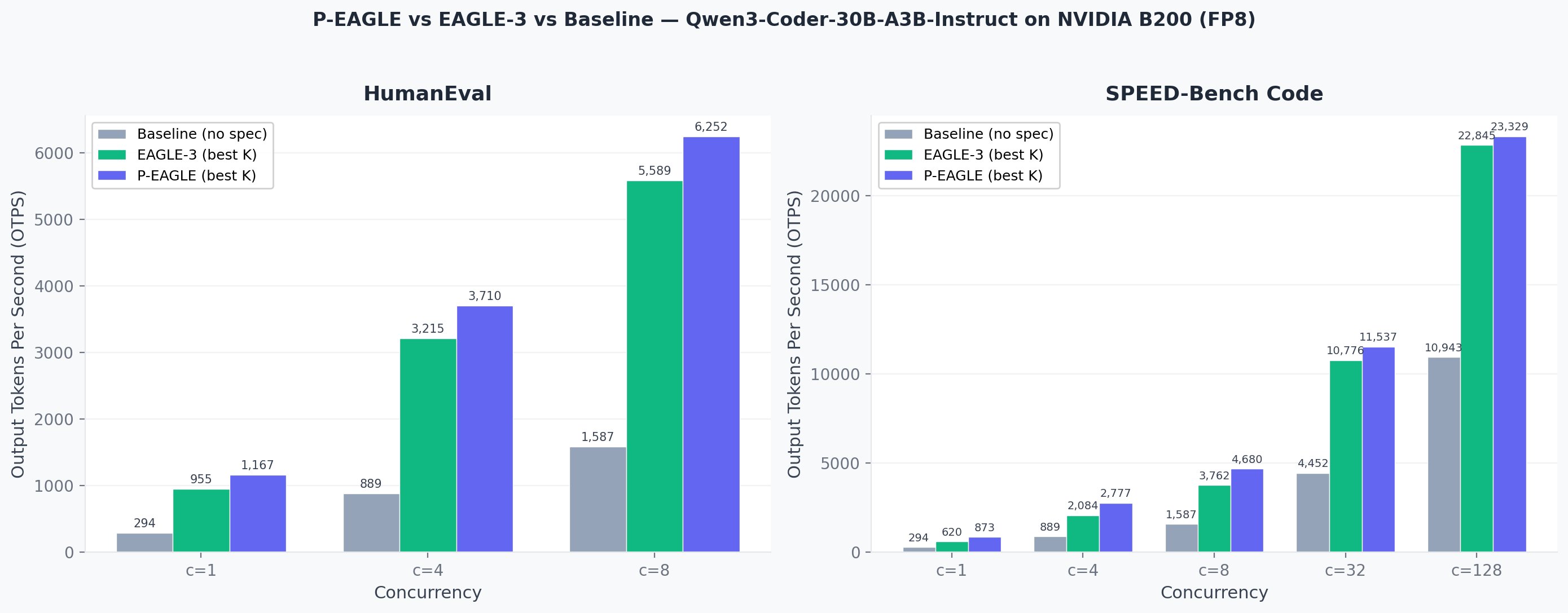
Organizations deploying large language models often face a trade-off between speed and cost. P-EAGLE reduces this tension by delivering both faster inference and lower compute overhead. A typical deployment might see 2-3x speedup in token generation, depending on the model size, draft model configuration, and hardware. This improvement is particularly valuable for real-time conversational AI, where every 100ms of latency reduction directly improves user satisfaction.

Use cases range from customer support chatbots that must respond within one second, to code generation APIs handling thousands of concurrent requests, to content creation platforms where users interact with the model in near real-time. SageMaker's monitoring and analytics tools help you measure the actual performance gains in your production environment, allowing for continuous optimization.

Monitoring and Optimization

SageMaker provides tools to track performance and fine-tune your deployment.

  • ›Use CloudWatch metrics to monitor endpoint latency, throughput, and resource utilization in real-time.
  • ›Enable detailed inference logging to understand which requests benefit most from parallel drafting.
  • ›Adjust drafting parameters based on production metrics to optimize for your specific traffic patterns.

After deploying your P-EAGLE endpoint, SageMaker automatically logs key performance indicators. You can view average latency per request, tokens generated per second, GPU memory consumption, and request error rates. This data helps you identify bottlenecks and validate that the deployment is delivering the expected speedup.

Next Steps and Best Practices

Maximize the benefits of P-EAGLE with these recommendations.

  • ›Start with SageMaker's recommended instance types to ensure adequate GPU memory for parallel drafting.
  • ›Test your endpoint with production-like traffic patterns before full rollout to validate performance assumptions.
  • ›Use SageMaker's A/B testing features to compare P-EAGLE deployments against baseline models and measure the business impact.

Best practices include load testing your endpoint under peak expected traffic, implementing proper error handling and retry logic in your client applications, and regularly reviewing cost and performance metrics. Consider using SageMaker's batch transform capability for non-real-time workloads, which can further reduce costs while maintaining parallelization benefits. Document your configuration choices and performance baselines to support future optimization and troubleshooting.

Frequently Asked Questions

What hardware is required to run P-EAGLE on SageMaker?

P-EAGLE requires GPU instances with sufficient memory to hold both the base model and draft models. Recommended instance types include ml.g4dn.12xlarge (NVIDIA A10G GPUs) or ml.p3.8xlarge (NVIDIA V100 GPUs). Exact requirements depend on your chosen model size.

Do I need to modify my existing models to use P-EAGLE?

No. SageMaker JumpStart provides pre-configured, compatible model pairs that work with P-EAGLE out of the box. You simply select a P-EAGLE-enabled model from the catalog and deploy it.

How much faster is P-EAGLE compared to standard inference?

Typical speedups range from 2-3x in token generation latency, depending on model size, draft configuration, and hardware. Your actual improvement will vary based on your specific workload and configuration.

Can I use P-EAGLE with my own custom models?

Yes, but you will need to manually integrate your model with the P-EAGLE framework and provide or train a compatible draft model. SageMaker JumpStart models require no additional work.

How do I monitor the performance of my P-EAGLE endpoint?

SageMaker integrates with CloudWatch to track latency, throughput, and resource utilization. You can also enable detailed inference logging to understand per-request performance and identify optimization opportunities.

P-EAGLE on SageMaker AI makes fast, cost-effective generative AI inference accessible to organizations of all sizes.

Continue Learning

Originally published by AWS Machine Learning
Read the original

Comments

Sign in to join the conversation