The fully-managed Remote MCP Server for AlloyDB is now Generally Available
Google Cloud announced that the fully-managed Remote Model Context Protocol (MCP) Server for AlloyDB is now generally available. MCP is an open-source standard that gives large language models a secure, consistent way to connect to external data sources, and this server lets AI agents securely access enterprise data in AlloyDB. The remote server runs on managed Google Cloud infrastructure and exposes an HTTP endpoint for connecting AI applications to data.
Key Takeaways
- AI agents possess incredible reasoning capabilities and can perform increasingly complex actions.
But the reliability of agentic outcomes depends entirely on the quality of the context they can access - context that is frequently locked away in operational databases.
- For example, you can now ask an AI agent for an up-to-the-millisecond view of your delivery fleet by connecting it to your real-time logistics data in AlloyDB, avoiding inaccuracies due to stale data and reducing the need for manual reporting.
Why AlloyDB is the strong foundation for agentic apps By connecting MCP to AlloyDB, your agents get access to the premier database built for enterprise-grade AI.
- Enterprise-grade scale: Rest easy with a 99.99% SLA , autopilot database optimizations, and auto-scaling read pools with up to 20 nodes.
Why Remote MCP matters for AlloyDB Local MCP servers are great for local development, but communicating over standard input/output (stdio) streams becomes difficult when you scale to production workloads.
- Configure your agent to use the endpoint to get started.
Fine-grained authorization : Instead of using shared database passwords or API keys, you use Identity and Access Management (IAM) to restrict agents to specific tables, schemas, or views.
- Audit logging : Every query, action, and tool call goes to Cloud Audit Logs , giving security teams a full audit trail.
Stats & Key Facts
- #AlloyDB delivers the scale, speed, and intelligence required for the most demanding agentic workloads: Supercharged vector performance: Scale to over 10 billion vectors at up to 6x the speed of standard PostgreSQL for vector queries (and up to 10x faster for filtered queries ) with the ScaNN index.
- #Enterprise-grade scale: Rest easy with a 99.99% SLA , autopilot database optimizations, and auto-scaling read pools with up to 20 nodes.
AI agents possess incredible reasoning capabilities and can perform increasingly complex actions. But the reliability of agentic outcomes depends entirely on the quality of the context they can access - context that is frequently locked away in operational databases. To bridge this gap, we are excited to announce the Remote Model Context Protocol (MCP) Server for AlloyDB is now generally available.
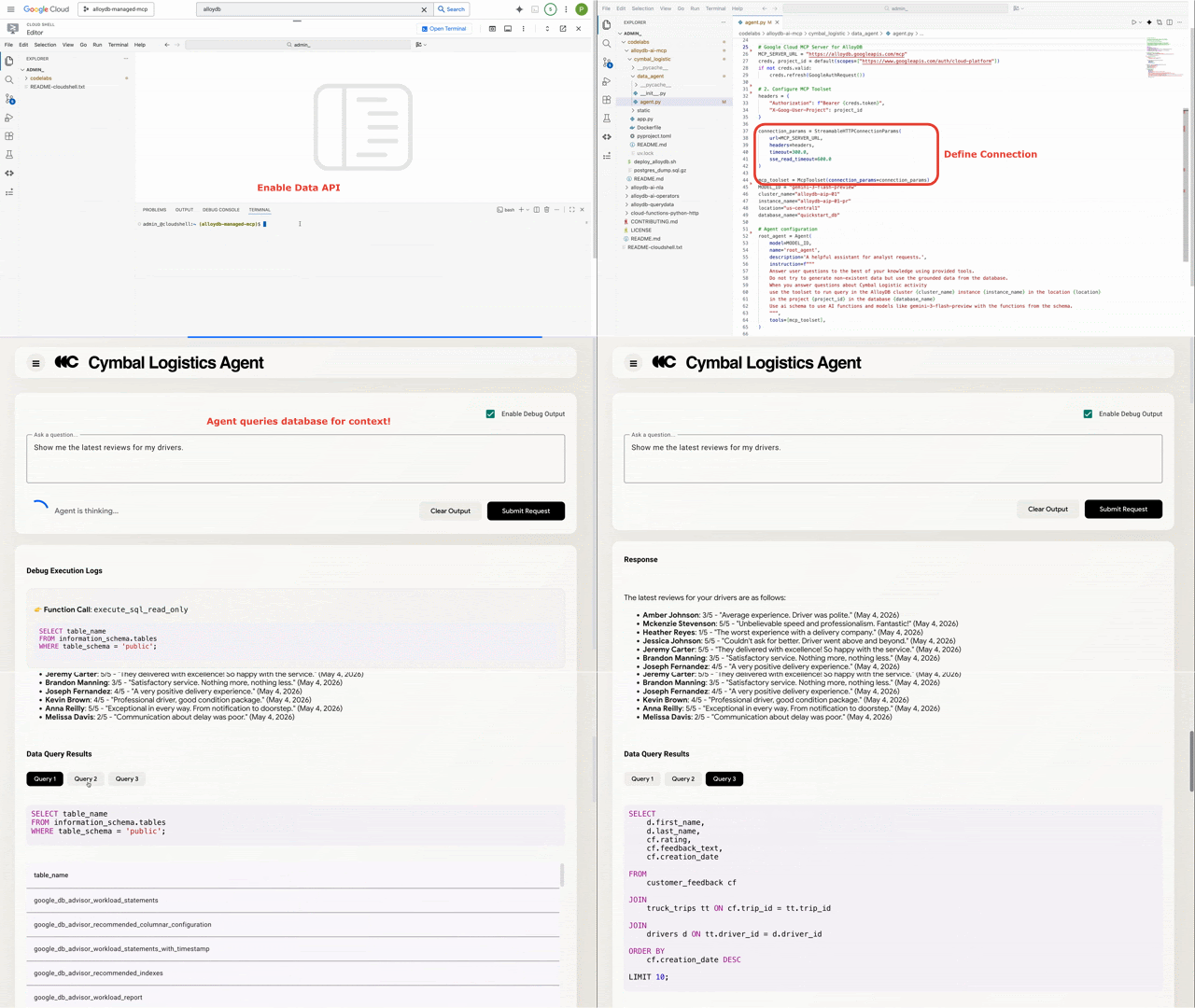
The Model Context Protocol (MCP) is an open-source standard that gives LLMs a secure, consistent way to connect to external data sources. As part of Google Cloud's recent rollout of 50+ Google-managed MCP servers , this new integration makes it easier than ever for both interactive and autonomous agents to securely harness the full power of your enterprise data. For example, you can now ask an AI agent for an up-to-the-millisecond view of your delivery fleet by connecting it to your real-time logistics data in AlloyDB, avoiding inaccuracies due to stale data and reducing the need for manual reporting.
Why AlloyDB is the strong foundation for agentic apps By connecting MCP to AlloyDB, your agents get access to the premier database built for enterprise-grade AI. AlloyDB delivers the scale, speed, and intelligence required for the most demanding agentic workloads: Supercharged vector performance: Scale to over 10 billion vectors at up to 6x the speed of standard PostgreSQL for vector queries (and up to 10x faster for filtered queries ) with the ScaNN index. Advanced search and reranking: Power multimodal applications with hybrid search via RUM (in Preview) and intelligent reranking through Reciprocal Rank Fusion (RRF) or Gemini Enterprise Platform models .
Real-time intelligence: Efficiently generate millions of embeddings using built-in AI Functions to facilitate low-latency, real-time agentic experiences. Unified data access: Give agents a single PostgreSQL interface to seamlessly join operational data in AlloyDB with analytical data in BigQuery or archived data in Iceberg tables via Lakehouse Federation . Enterprise-grade scale: Rest easy with a 99.99% SLA , autopilot database optimizations, and auto-scaling read pools with up to 20 nodes.
Why Remote MCP matters for AlloyDB Local MCP servers are great for local development, but communicating over standard input/output (stdio) streams becomes difficult when you scale to production workloads. It is both architecturally complex and administratively burdensome to provision and manage all of the infrastructure and security guardrails you need to run agents for high-value use cases that interact with sensitive operational data. The Remote MCP Server for AlloyDB runs on fully-managed Google Cloud infrastructure and exposes an HTTP endpoint that connects your AI applications to your data.
This solves key challenges for teams building agents on PostgreSQL: Centralized discovery : Find, secure, and manage your database's MCP server using Agent Registry . Fully-managed HTTP endpoints : No need to deploy or maintain the infrastructure required for connectivity. Configure your agent to use the endpoint to get started.
Fine-grained authorization : Instead of using shared database passwords or API keys, you use Identity and Access Management (IAM) to restrict agents to specific tables, schemas, or views. With the read-only execute SQL tool, you can prevent your agent from making accidental changes and deletions from your database. Operational instance management : The AlloyDB toolset gives agents the ability to do more than run queries.
Agents can update instances, export and import data, create backups, and restore clusters. Model Armor protection : Model Armor provides optional prompt and response security to screen and filter data, defending against prompt injections or accidental data exfiltration. Audit logging : Every query, action, and tool call goes to Cloud Audit Logs , giving security teams a full audit trail.
For more details please read the original article at Google Cloud AI.
Continue Learning
Comments
Comments appear only after moderation. Your email identifies your submission to the moderator and is never displayed here.
No approved comments yet.