Why AI apps fail in production (And how Google solved it)
We are living in the golden age of the weekend AI side project. Thanks to agentic engineering and LLMs, the time to go from a blank IDE to a functional local application has dropped from quarters to hours. You can build your wildest ideas over a cup of coffee.
Key Takeaways
- But inside an enterprise ecosystem with rigid infrastructure and millions of users, vibe coding hits an invisible wall.
Your local prototype falls apart against corporate networks, cascading errors, or getting blocked by leadership terrified of operational volatility.
- Writing agentic code is like piloting a nimble jet fighter-if an AI agent misbehaves, you rewrite the prompt and instantly restart the server.
But as AI engineering leader Addy Osmani points out in our premiere of Emergent , unconstrained agentic orchestration inside an enterprise introduces an unpredictable blast radius.
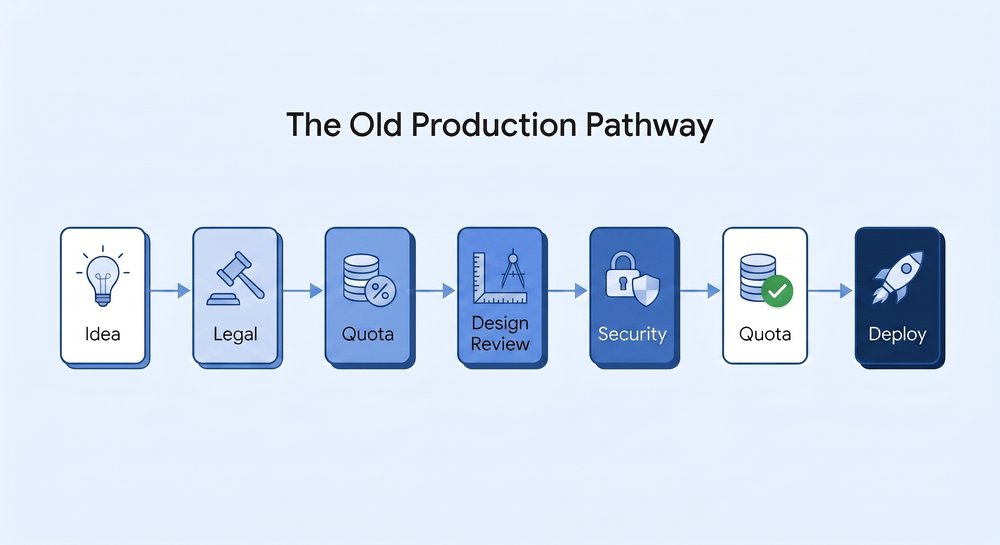
- Protecting a platform of this scale requires extensive, slow guardrails: By the time you build a primitive demo through this pipeline, the underlying AI models have evolved, leaving your idea out of date.
How do you move at lightspeed while minimizing systemic risk?
- These templates hook into a proxy server set up on Google Cloud for prototype-approved read-only data.
This instantly grants the prototype pre-authenticated, read-only API access to live metadata bundles (playlists, videos, channels) via strict tokens.
- Embrace throw-away code Implementing this stack requires a profound psychological shift.
Stats & Key Facts
- #The data is sobering: only 5% of AI prototypes make it to production; the other 95% fall into the validation abyss.
- #Its infrastructure handles billions of users on a robust, 20-year-old codebase.
But inside an enterprise ecosystem with rigid infrastructure and millions of users, vibe coding hits an invisible wall. Your local prototype falls apart against corporate networks, cascading errors, or getting blocked by leadership terrified of operational volatility. The data is sobering: only 5% of AI prototypes make it to production; the other 95% fall into the validation abyss.
For developers, watching people on social media ship lightning-fast AI deployments while you're stuck in endless validation loops is maddening. To figure out how to bridge this chasm, I went into the engineering trenches at YouTube to see how they manage this exact speed-versus-risk paradox. What I discovered completely rewrites the playbook on AI software development lifecycle (SDLC) design.
The risk-vs-speed paradox When you are solo-building, failure is cheap. Writing agentic code is like piloting a nimble jet fighter-if an AI agent misbehaves, you rewrite the prompt and instantly restart the server. But as AI engineering leader Addy Osmani points out in our premiere of Emergent , unconstrained agentic orchestration inside an enterprise introduces an unpredictable blast radius.
Addy recalls running ten parallel agents on a personal project, context-hopping and pushing code based purely on quick previews. The technical debt accumulated fast, breaking two apps catastrophically because the modifications weren't properly isolated. Amplify that risk to the scale of YouTube .
Its infrastructure handles billions of users on a robust, 20-year-old codebase. It is essentially a public utility; you cannot risk overloading it with experimental technical debt. Protecting a platform of this scale requires extensive, slow guardrails: By the time you build a primitive demo through this pipeline, the underlying AI models have evolved, leaving your idea out of date.
How do you move at lightspeed while minimizing systemic risk? YouTube's AI prototyping stack Deepmind and former YouTube software engineer, Benji Bear , solved this puzzle not by accelerating reviews, but by changing infrastructure philosophy. He and his team built a prototyping stack - a unified design-to-code lifecycle platform that completely decouples rapid experimentation from mainline production servers.
It systematically solves the two primary friction points of developer velocity. Decoupling the data layer Isolating a standalone app completely causes a "blank canvas" problem where you can't test prototypes against realistic conditions. To solve this, developers bootstrap their ideas using pre-built Google AI Studio templates.
These templates hook into a proxy server set up on Google Cloud for prototype-approved read-only data. This instantly grants the prototype pre-authenticated, read-only API access to live metadata bundles (playlists, videos, channels) via strict tokens. Developers get the technical accuracy of live production parameters without any ability to write back to, pollute, or crash core databases.
Live UI injection When a concept requires true real-world validation, the stack offers client-side YouTube Extension wrappers . This wrapper acts as glue code, allowing developers to inject their experimental features directly into the actual, live production web surface of YouTube. Code-split chunk safeguards isolate this from production binaries, allowing prototype updates to deploy to a safe staging environment in minutes.
YouTube went from taking multiple quarters to vet an idea to launching several successful prototypes - including YouTube Recap and Ask YouTube - straight to user research studies (UXR) in weeks. Embrace throw-away code Implementing this stack requires a profound psychological shift.
For more details please read the original article at Google Cloud AI.
Continue Learning
Comments
Comments appear only after moderation. Your email identifies your submission to the moderator and is never displayed here.
No approved comments yet.